Start here
A tour of the screen
3 min read
Goal: Know where every main control is before you start.
Steps
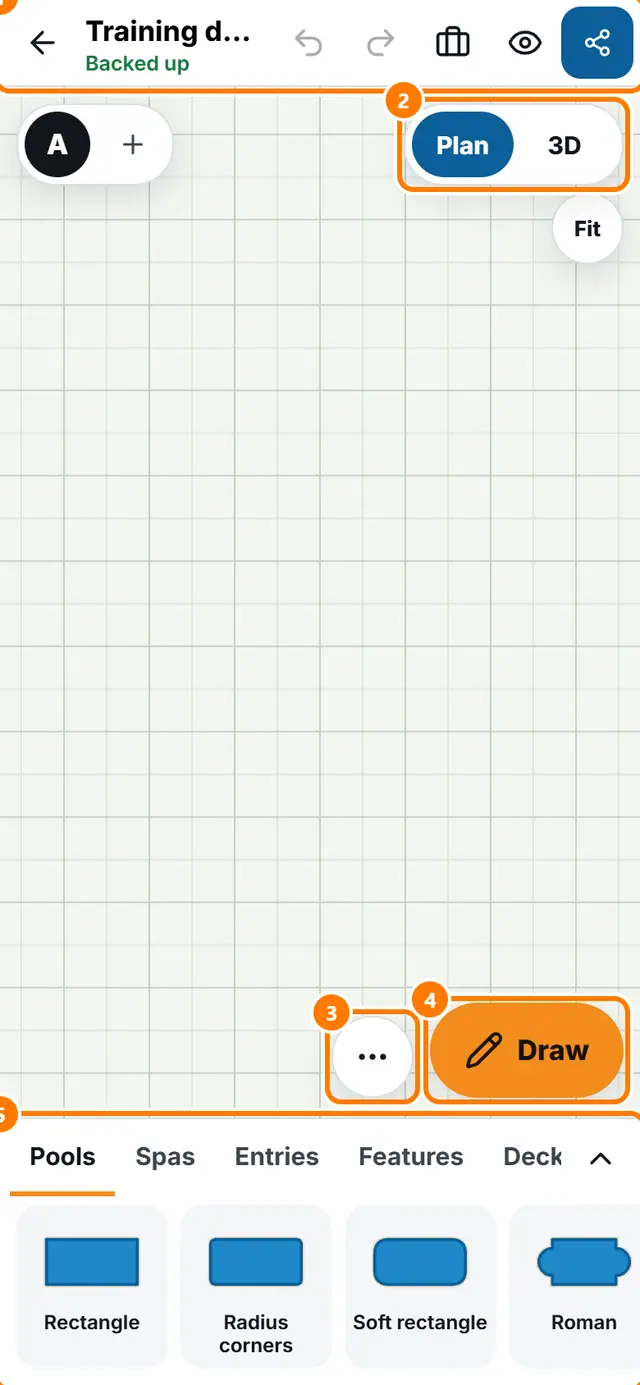
- The top bar has Back to designs, the customer name, Undo, Redo, Job details, Show the customer and Send.
- The Plan and 3D switch is at the top right. Plan is the drawing from above. 3D is the model.
- The letters at the top left are your options. Tap the plus to add another option.
- More tools (three dots) opens the tools menu: survey, address, landscape, Specs and quantities and more.
- Draw a shape is the pen button next to it.
- The tray at the bottom holds the pieces. Tap a tab such as Pools, Deck or Plants, then tap a piece.
- Tap a piece on the plan and a bar appears with Size, Turn, Copy, Points and Delete.